如何移除jar包签名

编译项目遇到SHA-256 digest error for org/bouncycastle/LICENSE.class

经过:从Gradle7.x升级到Gradle 8.x遇到如上错误

解决方案:

  • ./gradlew app:dependencies 找到是谁依赖了bouncycastle
  • 排除大法
    1
    2
    3
      implementation("com.example:some-library:1.0.0") {
    exclude group: 'org.bouncycastle', module: 'bcprov-jdk15on'
    }
  • 将bouncycastle这个jar包,使用命令:
    • 解开jar包的衣服:jar xf bouncycastle.jar
    • 删除META-INF/.SF META-INF/.RSA META-INF/.DSA(注意保留MANIFEST.MF,不然找不到代码哦)
    • 给jar包穿上衣服 jar cf bouncycastle-nosign.jar *
  • 将我们自己弄出来的没有签名的jar包放进libs目录
  • 运行项目,一切ok!

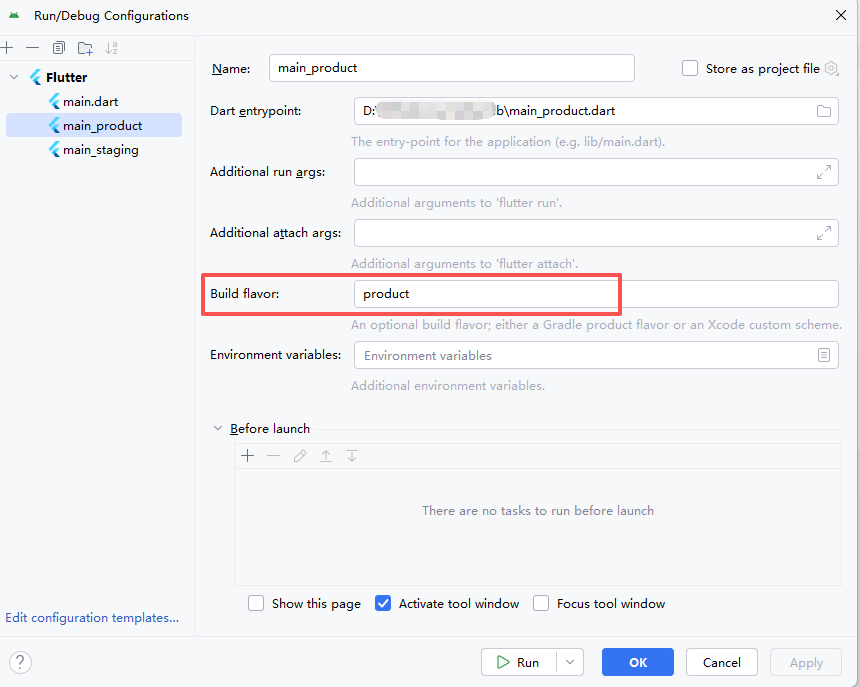
Flutter apk build success, build tool couldn't find it

When compiling an Android APK in a Flutter project, it prompts that the compiled APK cannot be found.

1
Error: Gradle build failed to produce an .apk file. It's likely that this file was generated under /Users/pengyin/Downloads/program/company/hilife/hilife3inone-flutter/build, but the tool couldn't find it.

In android/build.gradle, you can see the ‘product&staging’ flavor

1
2
3
4
5
6
7
8
9
10
11
12
13
14
15
16
productFlavors {
product {
dimension "app"
buildConfigField("boolean", "LOG_WRITE_DISABLE", "true")
ndk {
abiFilters 'armeabi-v7a', 'arm64-v8a'
}
}

staging {
dimension "app"
buildConfigField("boolean", "LOG_WRITE_DISABLE", "false")
ndk {
abiFilters 'armeabi-v7a', 'arm64-v8a'
}
}

Solution:

Image text

C/C++基础之三(指针引起的内存泄露)

注意观察下面的代码,如果new出来的对象忘记被delete释放,是会发生内存泄漏的。
1
2
3
4
5
6
7
8
9
10
11
12
13
14
15
16
17
18
19
20
21
22
23
24
25
26
27
28
29
30
#include <iostream>

using namespace std;

class Person{
private:
int age;
public:
// 构造函数
Person(){
cout << "Person()" << endl;
}
void print_info(){
cout << "person_info" << endl;
}
//析构函数
~Person(){
cout << "~Person()" << endl;
}
};

void test_func(){
Person *p = new Person();
p->print_info();
// delete p;
}

int main(){
test_func();
}
那么如何让使用指针不必有那么大的心智负担了?因为局部变量使用之后,程序会自动帮我调用其析构函数,因此我们要将指针变量的创建修改修改:
1
2
3
4
5
6
7
8
9
10
11
12
13
14
15
16
17
18
19
20
21
22
23
24
25
26
27
28
29
30
31
32
33
34
35
36
//引入sp,其意为SmartPoint
class sp{
private:
Person *p;
public:
sp(){
p = NULL;
cout << "sp()" << endl;
}

sp(Person *other){
this->p = other;
cout << "sp(Person *other)" << endl;
}

~sp(){
if (p)
{
delete p;
}
cout << "~sp()" << endl;
}

// 对 -> 操作符进行重载
Person* operator->(){
return p;
}

};


void test_func(){
sp s = new Person();
s->print_info();
}

输出如下,可以看到我们并没有主动delete,程序就避免了内存泄漏。
1
2
3
4
5
Person()
sp(Person *other)
person_info
~Person()
~sp()
接下来我们继续改进:
1
2
3
4
5
6
7
8
9
10
11
12
13
14
15
16
17
18
19
20
21
22
23
24
25
26
27
28
29
30
31
32
33
34
35
36
37
38
39
40
    sp(Person *other){
this->p = other;
cout << "sp(Person *other)" << endl;
}
// const是不能少的,
sp(const sp &other){
this->p = other.p;
cout << " sp(sp *other)" << endl;
}

~sp(){
if (p)
{
delete p;
}
cout << "~sp()" << endl;
}

// 对 -> 操作符进行重载
Person* operator->(){
return p;
}

};


void test_func(sp& s1){
// 会调用拷贝构造函数:sp(const sp &other)
sp s = s1; // 这是初始化,而不是赋值 ,赋值是:sp s; s = s1; 赋值会调用operator= 操作符函数,初始化会调用拷贝构造函数
s->print_info();
}

int main(){

sp s = new Person();
for(int i=0;i<2;i++){
test_func(s);
}

}
输出如下,程序发生了崩溃,因为两次进行delete p;
1
2
3
4
5
6
7
8
9
Person()
sp(Person *other)
sp(const sp *other)
person_info
~Person()
~sp()
sp(const sp *other)
person_info
~Person()
没事,遇事不要慌,东西都在后备箱,看我们的破解大法
1
2
3
4
5
6
7
8
9
10
11
12
13
14
15
16
17
18
19
20
21
22
23
24
25
26
27
28
29
30
31
32
33
34
35
36
37
38
39
40
41
42
43
44
45
46
47
48
49
50
51
52
53
54
55
56
57
58
59
60
61
62
63
64
65
66
67
68
69
70
71
class Person{
private:
int age;
int count;
public:
// 构造函数
Person(){
cout << "Person()" << endl;
}
//增加引用计数
void incCount(){
this->count++;
}
//减少引用计数
void decCount(){
this->count--;
}
// 获取引用计数
int getCount(){
return this->count;
}
void print_info(){
cout << "person_info" << endl;
}
//析构函数
~Person(){
cout << "~Person()" << endl;
}
};

//引入sp,其意为SmartPoint
class sp{
private:
Person *p;
public:
sp(){
p = NULL;
cout << "sp()" << endl;
}

sp(Person *other){
this->p = other;
this->p->incCount();
cout << "sp(Person *other)" << endl;
}
// const是不能少的,
sp(const sp &other){
this->p = other.p;
this->p->incCount();
cout << " sp(const sp *other)" << endl;
}

~sp(){
if (p)
{
if (p->getCount()>1)
{ //存在多个引用
p->decCount();
}else{
delete p;
}
}
cout << "~sp()" << endl;
}

// 对 -> 操作符进行重载
Person* operator->(){
return p;
}

};

Person只new了一个,因此也只析构了一次,程序正确:

1
2
3
4
5
6
7
8
9
10
Person()
sp(Person *other)
sp(const sp *other)
person_info
~sp()
sp(const sp *other)
person_info
~sp()
~Person()
~sp()
程序似乎还不够优美,1. 引用计数写在Person里面的 2. 如果换一个类怎么办了?
  1. 引入RefBase基类用于计数
  2. 使用模板类实现任意对象的自定义只能指针

一切尽在不言中,上代码

1
2
3
4
5
6
7
8
9
10
11
12
13
14
15
16
17
18
19
20
21
22
23
24
25
26
27
28
29
30
31
32
33
34
35
36
37
38
39
40
41
42
43
44
45
46
47
48
49
50
51
52
53
54
55
56
57
58
59
60
61
62
63
64
65
66
67
68
69
70
71
72
73
74
75
76
77
78
79
80
81
82
83
84
85
86
87
88
89
90
91
92
93
94
95
96
97
98
99
100
101
102
103
104
class RefBase{
private:
int count; //构造对象时不初始化会得到一个无法想象的结果
public:

RefBase():count(0){
cout << "RefBase()" << endl;
}

void incCount(){
this->count++;
}
void decCount(){
this->count--;
}
int getCount(){
return this->count;
}

virtual ~RefBase(){
cout << "~RefBase" << endl;
}

};


class Person : public RefBase{
private:
int age;

public:
// 构造函数
Person(){
cout << "Person()" << endl;
}
void print_info(){
cout << "person_info" << endl;
}
//析构函数
~Person(){
cout << "~Person()" << endl;
}
};

//引入sp,其意为SmartPoint
template<typename T>
class sp{
private:
T *p;
public:
sp(){
p = NULL;
cout << "sp()" << endl;
}

sp(T *other){
this->p = other;
this->p->incCount();
cout << "sp(Person *other)" << endl;
}
// const是不能少的, 拷贝构造函数:sp s2 = s1; sp s3(s1); 这两种创建对象的方式都会调用拷贝构造函数; sp s4; s4 = s1; 这种写法只会调用 operator= 操作符函数
sp(const sp &other){
this->p = other.p; // 指针的直接拷贝
this->p->incCount();
cout << " sp(const sp *other)" << endl;
}

~sp(){
if (p)
{
cout << "value is :" << p->getCount() << endl;
if (p->getCount()>1)
{ //存在多个引用
p->decCount();
}else{
delete p;
}
}
cout << "~sp()" << endl;
}

// 对 -> 操作符进行重载,返回Person的指针
T* operator->(){
return p;
}

};

template<typename T>
void test_func(sp<T>& s1){
// 会调用拷贝构造函数:sp(const sp &other)
sp<T> s = s1; // 这是初始化,而不是赋值 ,赋值是:sp s; s = s1; 赋值会调用operator= 操作符函数,初始化会调用拷贝构造函数
s->print_info();
}

int main(){
//只new了一次,
sp<Person> s = new Person();
//test_func结束被释放两次???
for(int i=0;i<2;i++){
test_func(s);
}

}
输出
1
2
3
4
5
6
7
8
9
10
11
12
13
14
15
RefBase
Person()
sp(Person *other)
sp(const sp *other)
person_info
value is :2
~sp()
sp(const sp *other)
person_info
value is :2
~sp()
value is :1
~Person()
~RefBase
~sp()

那么到这里是否就结束了呢?No, 并没有,实际上这个代码是线程不安全的。Android源码中就有很好的例子,__sync_fetch_and_add就是确保线程安全。

1
2
3
4
5
6
7
8
9
inline LightRefBase() : mCount(0) { }
inline void incStrong(__attribute__((unused)) const void* id) const {
__sync_fetch_and_add(&mCount, 1);
}
inline void decStrong(__attribute__((unused)) const void* id) const {
if (__sync_fetch_and_sub(&mCount, 1) == 1) {
delete static_cast<const T*>(this);
}
}

C/C++基础之二(类的构造函数)

C/C++基础之二(类的构造函数)

Talk is cheap. Show me the code.

1. 构造函数,有参,无参?

2. 析构函数的调用时机?

3. 如何在构造函数中初始化某个成员类?

4. 拷贝构造函数的凶残?

5. 操作符重载的奇妙设计!

1
2
3
4
5
6
7
8
9
10
11
12
13
14
15
16
17
18
19
20
21
22
23
24
25
26
27
28
29
30
31
32
33
34
35
36
37
38
39
40
41
42
43
44
45
46
47
48
49
50
51
52
53
54
55
56
57
58
59
60
61
62
63
64
65
66
67
68
69
70
71
72
73
74
75
76
77
78
79
80
81
82
83
84
85
86
87
88
89
90
91
92
93
94
95
96
97
98
99
100
101
102
103
104
105
106
107
108
109
110
111
112
113
114
115
116
117
118
119
120
121
122
123
124
#include <iostream>
#include <string.h>

using namespace std;

class Person
{
private:
char *name;
char *work;
char *sex;
int age;
public:
Person();
Person(char *name,char *work,int age,char *sex=(char *)"f");
~Person();
void setAge(int age);
void setName(char *name);
void printInfo();
};


//无参构造函数
Person::Person(/* args */)
{
cout << "Person()" << endl;
// 对指针变量赋初值很重要,否则是野指针,直接访问非常危险,会有问题的
this->name = NULL;
this->work = NULL;
this->sex = NULL;
}

Person::Person(char *name,char *work,int age,char *sex)
{
// 下面变量共享内存的写法,也叫做浅拷贝,如果外部被释放,那么这里就成了野指针。很危险
// this->name = name;
// this->work = work;
// 分配内存,也叫做深拷贝,安全,但要记得自己释放new出来的内存,释放交给析构函数
this->name = new char[strlen(name)+1];
strcpy(this->name,name);

this->work = new char[strlen(work)+1];
strcpy(this->work,work);

this->sex = new char[strlen(sex)+1];
strcpy(this->sex,sex);

this->age = age;
cout << "Person(char *name,char *work,int age)" << ",name:"<< name << ",work:"<< work <<",age:"<< age <<",sex:"<< sex << endl;
}

void Person::printInfo()
{
cout << "name:"<< name << ",work:"<< work <<",age:"<< age << endl;
}

// 析构函数
Person::~Person()
{
cout << "~Person(),name:" << this->name << endl;
if (this->name)
{
cout << "delete name:" << this->name << endl;
// C++ 要严格遵守 new ↔ delete,new[] ↔ delete[]。
// delete this->name;
delete[] this->name;
}
if (this->work)
{
cout << "delete work:" << this->work << endl;
// C++ 要严格遵守 new ↔ delete,new[] ↔ delete[]。
delete[] this->work;
}

if(this->sex)
{
// C++ 要严格遵守 new ↔ delete,new[] ↔ delete[]。
cout << "delete sex:" << this->sex << endl;
delete[] this->sex;
}

}

class Student
{
private:
Person father;
Person mother;
int id;
public:
Student()
{
cout << "Student()" << endl;
}
// 构造函数中完成成员变量的初始化,成员变量的初始化和:father(...),mother(...)无关,之和上面的成员定义顺序有关
Student(char *fatherName,char *motherName,int id):father(fatherName,"CFO",28,(char *)"M"),mother(motherName,"BOSS",18)
{
this->id = id;
}
~Student()
{
cout << "~Student()"<<endl;
}
};

void person_test()
{
Person *p = new Person("lisi","student",18);
//new出来的内存一定要释放掉,否则它是不会释放的
delete p;
}

int main()
{
Person per;
//注意下面这行代码并没有创建per1对象,只是一个方法声明,类似 int sum();
Person per1();
// 调用有参数的构造函数,最后一个sex参数使用默认值
Person per2("zhangsan","laywer",48);
Person per3("wangwu","CEO",29,"M");
person_test();
Student s("Jack","Alice",10);
return 0;
}
  • 输出如下
1
2
3
4
5
6
7
8
9
10
11
12
13
14
15
16
17
18
19
20
21
22
23
24
25
26
27
28
Person()
Person(char *name,char *work,int age),name:zhangsan,work:laywer,age:48,sex:f
Person(char *name,char *work,int age),name:wangwu,work:CEO,age:29,sex:M
Person(char *name,char *work,int age),name:lisi,work:student,age:18,sex:f
~Person(),name:lisi
delete name:lisi
delete work:student
delete sex:f
Person(char *name,char *work,int age),name:Jack,work:CFO,age:28,sex:M
Person(char *name,char *work,int age),name:Alice,work:BOSS,age:18,sex:f
~Student()
~Person(),name:Alice
delete name:Alice
delete work:BOSS
delete sex:f
~Person(),name:Jack
delete name:Jack
delete work:CFO
delete sex:M
~Person(),name:wangwu
delete name:wangwu
delete work:CEO
delete sex:M
~Person(),name:zhangsan
delete name:zhangsan
delete work:laywer
delete sex:f
~Person(),name:
我们写了一些属性以及get/set方法,当这个类交给一个工具类的时候他想做一些操作,因为属性一般是private的,因此他必须要调用get,set方法,那么就出现了一种叫做firend的函数,可以直接访问私有属性,上代码:
1
2
3
4
5
6
7
8
9
10
11
12
13
14
15
16
17
18
19
20
21
22
23
24
25
26
27
28
29
30
31
32
33
34
35
36
37
38
39
40
41
42
43
44
45
46
47
48
49
50
51
52
53
54
55
56
57
58
59
60
61
62
63
64
65
66
67
68
69
70
71
72
73
74
75
76
77
78
79
#include <iostream>

using namespace std;

class Point;

class PointUtils
{
private:
/* data */
public:
PointUtils
(/* args */);
Point pointSum(const Point& p1,const Point& p2);
~PointUtils
();
};

class Point{
private:
int x;
int y;

public:
Point(){}

Point(int x,int y){
this->x = x;
this->y = y;
}

void setX(int x){
this->x = x;
}

void setY(int y){
this->y = y;
}

int getX(){
return this->x;
}

int getY(){
return this->y;
}
//声明PointUtils的pointSum是我的朋友,可以访问我的属性
friend Point PointUtils::pointSum(const Point& p1,const Point& p2);

void printInfo(){
cout << "x:" << this->x << ",y:" << this->y << endl;
}

};

PointUtils::PointUtils(/* args */)
{
}

Point PointUtils::pointSum(const Point& p1,const Point& p2){
Point result;
//友元函数,可以直接访问x,y,就不用使用get方法啦
result.x = p1.x + p2.x;
result.y = p1.y + p2.y;
return result;
}

PointUtils::~PointUtils()
{
}

int main(){
Point p1(10,20);
Point p2(20,30);
PointUtils util;
Point result = util.pointSum(p1,p2);
result.printInfo();
return 0;
}
然后上面的程序似乎没有问题,但是其实是有问题的。这个问题来自于类的拷贝:

1️⃣ 浅拷贝的定义

浅拷贝就是 直接拷贝对象的所有成员,包括指针 只拷贝指针本身的值(地址),而不拷贝指针指向的内容。

例如:

class Demo {
public:
int* ptr;
Demo(int val) { ptr = new int(val); }
~Demo() { delete ptr; }
};

int main() {
Demo d1(5);
Demo d2 = d1; // 默认拷贝构造函数执行 → 浅拷贝
}

d2.ptr 和 d1.ptr 指向同一块堆内存

当 d1 析构时释放了内存 → d2.ptr 悬空

再析构 d2 → double free / 崩溃

✅ 这就是浅拷贝的典型问题。

2️⃣ 什么时候会触发浅拷贝
(1) 按值传递对象
void foo(Demo d) { … } // d 是按值传递
Demo obj(5);
foo(obj); // 触发拷贝构造(默认浅拷贝)

函数内部会调用 拷贝构造函数

默认拷贝构造函数就是浅拷贝

(2) 返回对象(按值返回)
Demo createDemo() {
Demo d(10);
return d; // 触发拷贝构造(默认浅拷贝)
}

编译器通常会做 返回值优化(RVO) 避免拷贝,但如果没有 RVO,也会发生浅拷贝

(3) 对象赋值
Demo d1(5);
Demo d2(10);
d2 = d1; // 默认赋值运算符 → 浅拷贝

这里 d2 的原 ptr 被覆盖

如果原 ptr 已经分配了内存,可能造成内存泄漏

同时 d1 和 d2 共享同一块内存 → double-free

3️⃣ 浅拷贝的问题

悬空指针:多个对象指向同一块动态分配内存

double-free:析构函数释放同一块内存两次

内存泄漏:赋值时忘记释放旧的资源

4️⃣ 解决方法

深拷贝(deep copy):在拷贝构造和赋值运算符中,重新分配内存并复制内容

使用智能指针或 std::string:自动管理内存,避免浅拷贝问题

下面看看我们的例子,使用深拷贝构造函数&‘=’运算符重写,解决这个棘手的问题:
1
2
3
4
5
6
7
8
9
10
11
12
13
14
15
16
17
18
19
20
21
22
23
24
25
26
27
28
29
30
31
32
33
34
35
36
37
38
39
40
41
42
43
44
45
46
47
48
49
50
51
52
53
54
55
56
57
58
59
60
61
62
63
64
65
66
67
68
69
70
71
72
73
74
75
76
77
78
79
80
81
82
83
84
85
86
87
88
89
90
91
92
93
94
95
96
97
98
99
100
101
102
103
104
105
106
107
108
109
110
111
112
113
114
115
116
117
118
119
120
121
122
123
124
125
126
127
128
129
130
131
132
133
134
135
136
137
138
139
140
141
142
143
144
145
146
147
148
149
150
151
152
153
154
155
156
157
158
159
160
161
162
163
164
165
166
167
168
169
170
171
172
173
174
175
176
177
178
179
180
181
182
183
184
185
186
187
188
189
190
191
192
193
194
195
196
197
198
199
200
201
202
203
204
205
206
207
208
209
210
211
212
213
214
215
216
217
218
219
220
221
222
#include <iostream>
#include <string.h>

using namespace std;

class Point;

class PointUtils
{
private:
/* data */
public:
PointUtils
(/* args */);
Point pointSum(const Point& p1,const Point& p2);
~PointUtils
();
};

class Point{
private:
int x;
int y;
char *niceName;

public:
Point(){
niceName = NULL;
cout << "Point()" << endl;
}

// 深拷贝构造函数
Point(const Point& p){
cout << "Copy (const Point& p)" << endl;
this->x = p.x;
this->y = p.y;
if(p.niceName){
this->niceName = new char[strlen(p.niceName)+1];
strcpy(this->niceName,p.niceName);
}else{
this->niceName = nullptr;
}
}

// 赋值运算符
Point& operator=(const Point& other){
cout << "operator=" << endl;
if(this == &other) return *this;
x = other.x;
y = other.y;
delete[] niceName;
if(other.niceName){
niceName = new char[strlen(other.niceName)+1];
strcpy(niceName, other.niceName);
} else niceName = nullptr;
return *this;
}

Point(int x,int y,const char *niceName){
cout << "Point(int x,int y)" << "x:" << x <<",y:" << y << niceName << endl;
this->x = x;
this->y = y;

this->niceName = new char[strlen(niceName)+1];
strcpy(this->niceName,niceName);
}

void setX(int x){
this->x = x;
}

void setY(int y){
this->y = y;
}

int getX(){
return this->x;
}

int getY(){
return this->y;
}

friend Point PointUtils::pointSum(const Point& p1,const Point& p2);

// 重载 int + point
friend Point operator+(int a, Point& p){
cout << "operator+(int a, Point& p)" << endl;
Point result;
result.x = a + p.x;
result.y = a + p.y;
result.niceName = new char[10];
strcpy(result.niceName,"operator+");
return result;
}

//重载 point + int
friend Point operator+(Point& p, int a){
cout << "operator+(Point& p, int a)" << endl;
Point result;
result.x = a + p.x;
result.y = a + p.y;
result.niceName = new char[10];
strcpy(result.niceName,"operator+");
// result.niceName = nullptr;
return result;
}

// 重载 前++
Point& operator++(){
cout << "operator++()" << endl;
this->x = this->x + 1;
this->y = this->y + 1;
if (niceName)
{
delete[] niceName;
}
niceName = new char[10+1];
strcpy(niceName,"operator++");
return *this;
}

Point operator++(int){
Point temp(*this); // 保存当前值
x++; y++;
return temp; // 返回修改前的副本
}


void printInfo(){
cout << "printInfo" << "x:" << this->x << ",y:" << this->y;
if (niceName)
{
cout << niceName;
}
cout << endl;
}

~Point(){
cout << "~Point()" << "x:" << this->x << ",y:" << this->y;
if (niceName)
{
cout << "delete:" << niceName;
// delete只能删除 new 出来的,niceName = "abcd" 就不能删除哦!否则要出大问题
delete[] niceName;
}
cout << endl;
// cout << this << end;
}

};

PointUtils::PointUtils(/* args */)
{
}

Point PointUtils::pointSum(const Point& p1,const Point& p2){
Point result;
result.x = p1.x + p2.x;
result.y = p1.y + p2.y;

// 判断 p1.niceName 和 p2.niceName 是否为空
const char* name1 = p1.niceName ? p1.niceName : "";
const char* name2 = p2.niceName ? p2.niceName : "";

// 分配内存:长度 = name1 + name2 + 1('\0')
size_t len = strlen(name1) + strlen(name2) + 1;
result.niceName = new char[len];

// 拼接字符串
strcpy(result.niceName, name1);
strcat(result.niceName, name2);

return result;
}

PointUtils::~PointUtils()
{
}

int main(){
// Point p1(10,20);
// Point p2(20,30);
// PointUtils util;
// Point result = util.pointSum(p1,p2);
// Point result = p1.add(p2);
int ax[] = {1,2};
int ay[] = {1,2};
int bx[] = {3,4};
int by[] = {3,4};
PointUtils util;
Point pArray[2];

for(int i=0;i<2;i++){
cout << "For" << endl;
char* aNiceName = (char*)malloc(sizeof(char)*2+1);
sprintf(aNiceName, "a%d", i);
char* bNiceName = (char*)malloc(sizeof(char)*2+1);
sprintf(bNiceName, "b%d", i);
Point p1(ax[i],ay[i],aNiceName);
Point p2(bx[i],by[i],bNiceName);
Point result = util.pointSum(p1,p2);
result.printInfo();
// operator= 对于‘=’的重载生效,深拷贝!
pArray[i] = result;
free(aNiceName);
free(bNiceName);
}
cout << "***last dance***" << endl;

Point result2 = 3 + pArray[0];
Point result3 = pArray[1] + 3;
result2.printInfo();
result3.printInfo();
// 运算符重载,前++
++result3;
result3.printInfo();

result2++;
result2.printInfo();
return 0;
}
输出结果
1
2
3
4
5
6
7
8
9
10
11
12
13
14
15
16
17
18
19
20
21
22
23
24
25
26
27
28
29
30
31
32
33
34
35
36
Point()
Point()
For
Point(int x,int y)x:1,y:1a0
Point(int x,int y)x:3,y:3b0
Point()
printInfox:4,y:4a0b0
operator=
~Point()x:4,y:4delete:a0b0
~Point()x:3,y:3delete:b0
~Point()x:1,y:1delete:a0
For
Point(int x,int y)x:2,y:2a1
Point(int x,int y)x:4,y:4b1
Point()
printInfox:6,y:6a1b1
operator=
~Point()x:6,y:6delete:a1b1
~Point()x:4,y:4delete:b1
~Point()x:2,y:2delete:a1
***last dance***
operator+(int a, Point& p)
Point()
operator+(Point& p, int a)
Point()
printInfox:7,y:7operator+
printInfox:9,y:9operator+
operator++()
printInfox:10,y:10operator++
Copy (const Point& p)
not null?operator+~Point()x:7,y:7delete:operator+
printInfox:8,y:8operator+
~Point()x:10,y:10delete:operator++
~Point()x:8,y:8delete:operator+
~Point()x:6,y:6delete:a1b1
~Point()x:4,y:4delete:a0b0

C/C++基础之一

C/C++基础之一(数据类型、数组、指针、结构体)

Talk is cheap. Show me the code.

  • 结构体定义
1
2
3
4
5
6
7
8
9
10
11
12
13
14
15
16
17
18
19
20
21
22
23
24
#ifndef TYPEDEFINE_H
#define TYPEDEFINE_H
//枚举的使用
typedef enum{
RED = 0,
YELLOW = 1,
GREEN = 2
}TrafficLight;

typedef enum{
START,
RUNNING,
SUSPEND,
STOP,
DESTORY
}Mission;

struct Student
{
int age;
int sex;
char lastName[10];
char firstName[10];
};
  • main函数
1
2
3
4
5
6
7
8
9
10
11
12
13
14
15
16
17
18
19
20
21
22
23
24
25
26
27
28
29
30
31
32
33
34
35
36
37
38
39
40
41
42
43
44
45
46
47
48
49
50
51
52
53
54
55
56
57
58
59
60
61
62
63
64
65
66
67
68
69
70
71
72
73
74
75
76
77
78
79
80
81
82
83
84
85
86
87
88
89
90
91
92
93
94
95
96
97
98
99
100
101
102
103
104
105
106
107
108
109
110
111
112
113
114
115
116
117
118
119
120
121
122
123
124
125
126
127
128
129
130
131
132
133
134
135
136
137
138
139
140
141
142
143
144
145
146
147
148
149
150
151
152
153
154
155
156
157
158
159
160
161
162
163
164
165
166
167
168
169
170
171
172
173
174
175

void testDatatype()
{
printf("数据类型:\n");
int intValue = 1;
printf("整型%d\n",intValue);
char charValue = 'a';
printf("char类型:%c\n",charValue);
unsigned int uintValue = 2;
printf("无符号整型:%d\n",uintValue);
float fValue = 3.14;
double dValue = 3.14;
//long 是4 byte, long long是8字节
long long lValue = 123456789;
printf("float类型:%.2f\n",fValue);
printf("double类型%f\n",dValue);
printf("long类型:%ld\n",lValue);
//除此之外还有一些无符号整型的类型 ,无符号第一位不表示正负符号,只存在正数,因此比有符号的正数大一倍。
//unsigned int
//unsigned short
//unsigned char
//unsigned long
}

//指针
void testPointer()
{
int a = 10;
int *p = &a;
int **pp = &p;
printf("\n");
printf("a value:%d\n,a address is:%p\n",a,&a);
// &p p这个int指针自身的内存地址
//p p指针存放的地址值,
//*p 解引用,得到p指针存放的地址值所指向的值
printf("p memroy address is:%p,p point address is%p, p point value is:%d\n",&p,p,*p);
// pp 是pp指针的值, &pp是指针的内存地址, **pp是两次解引用,得到p指针所指向的值
// *pp 一次解引用,得到p的值,也就是a的地址
printf("*pp is%p, pp memroy address is:%p,pp point address value is:%p\n, pp value:%d\n",*pp, &pp, pp,**pp);


int s = 1024;
int *sP = &s;
// 发生了隐式转换 'b' == 98
*sP = 'b';

printf("s origin address:%p\n",&s);
printf("sp point address:%p\n",&sP);
printf("sP point target address:%p\n",sP);
printf("sP point target vakye:%c\n",*sP);
printf("point sieze:%d\n",sizeof(*sP));
printf("%d\n",s);

int arrayA[] = {1,2,3};
int *pA = arrayA;

printf("pA is :%d\n",*(pA+2));

int arrayB[2][3] = {{1,2,3},{4,5,6}};
int (*arrayBP)[3] = arrayB;
//int (*p)[3] 是指针,指向“每行 3 个元素”的数组。
int (*pC)[3] = arrayB;
printf("arrayBP[0][2]%d\n",arrayBP[0][2]);
printf("%d\n",(*(*(pC+1)+2)));

}

int testCalculate(int a, int b)
{
return a + b;
}

void testArray()
{
//数组测试,数组在创建的时候必须指明容量,不要越界访问
int a[] = {1,3,5};
int b[10];
for(int i =0;i<10;i++)
{
b[i] = i;
}
// 二维数组
int c[2][3] = {{1,2,3},{4,5,6}};

char str[] ="hello";
// 得到的这个长度是6,多了一个\0
int charArrayLength = sizeof(str)/sizeof(str[0]);
printf("%d\n",charArrayLength);
printf("%d\n",sizeof(str));
for(int i=0;i<charArrayLength;i++)
{
printf("%c\n",str[i]);
}
}

char* reverseChars(char *s,int length)
{
//1.当前的字符串长度,下面这个写法是错误的,因为sizeof(s) 是指针的长度,指针的长度是4 byte
// int length = sizeof(s)/sizeof(s[0]);
printf("the length is %d",length);
//2.创建存储结果的字符串数组
char *targetResult = (char *)malloc((length+1) * sizeof(char));
if (targetResult == NULL)
{
printf("内存分配失败");
return NULL;
}
//3.for倒叙循环获取字符,存入数组
for(int i=0;i<length;i++)
{
targetResult[i] = s[length-1-i];
}

targetResult[length] = '\0';
//4.返回结果
return targetResult;
}

int main()
{
testDatatype();
testPointer();
//测试指针函数,指针函数作为一个变量可以在函数间传递,方便的进行回调,使得程序更加灵活。
int (*pSumFunc)(int,int) = testCalculate;
int result = pSumFunc(10,20);
printf("Sum is:%d\n",result);

int i = 0;
int count = 10;

for (i = 0; i < count; i++)
{
printf("value is:%d \n",calculateSub(i*i,i));
}

//test enum
TrafficLight currentLight = YELLOW;
printf("current light is:%d",currentLight);

// struct Student student;
// student.age = 15;
// student.sex = 1;
// lastName是char[10], c语言中数组不能整体赋值, 所以下面的赋值是错误的
// student.lastName = {'x','y','z'};
// student.firstName = {'a','b','c','d'};

//下面是结构体的几种赋值
struct Student student = {15,1,"y","p"};
//使用strcpy赋值
struct Student student2;
strcpy(student2.firstName,"p");
//或者如下
student2.lastName[0] = 'c';
student2.lastName[1] = 'h';
student2.lastName[2] = 'e';
printf("%s %s\n",student.firstName,student.lastName);
printf("%s %s\n",student2.firstName,student2.lastName);

// 字符串反转
char *sArray = "abcdefg";
//获取长度这里问题就来了,如果使用sizeof(s) / sizeof(s[0]); 这种获取的是包含结尾\0的
//如果通过strlen(s); 那么是不包含\0的
if ((sArray!=NULL))
{
//下面计算长度这个写法是错误的
//数组 → 可以用 sizeof 计算长度
// 指针 → 必须用 strlen(s) 来计算字符串长度
// int sLength = sizeof(sArray)/sizeof(sArray[0]) - 1; // -1移除\0
int sLength = strlen(sArray);
char *sResult = reverseChars(sArray,sLength);
printf("倒叙结果:%s\n",sResult);
free(sResult);
}
return 0;
}

Android源码阅读之———广播的注册与分发

这一节去分析一下广播的注册,广播消息的分发过程。


一些概念:
  1. 无序广播:默认发送的就是无序广播,所有注册了的广播几乎在同一时刻接收到广播消息;
  2. 有序广播:优先级越高越先收到,传递过程中,可以控制结束该广播,也可以修改传递数据;
  3. 粘性消息:发送的粘性消息一直存放在AMS中,当注册广播时,如果之前已经有粘性消息存在,则直接派发。
1
2
3
4
5
6
7
8
9
10
11
12
13
14
15
16
17
18
19
20
21
22
23
24
25
26
27
28
29
30
31
32
33
34
35
36
37
38
39
40
41
#ContextImpl$registerReceiver
private Intent registerReceiverInternal(BroadcastReceiver receiver, int userId,
IntentFilter filter, String broadcastPermission,
Handler scheduler, Context context, int flags) {
//注意这个IIntentReceiver,看名字就知道是个接口。在AndroidStudio中找不到。一搜索,咦,这是个aidl文件。
//我们知道这个IIntentReceiver用于Binder通信,且在此是作为服务端。
IIntentReceiver rd = null;
if (receiver != null) {
if (mPackageInfo != null && context != null) {
if (scheduler == null) {
//ActivityThread中的mH,是一个Handler
scheduler = mMainThread.getHandler();
}
(1) //mPackageInfo是LoaderApk类型,其中创建了ReceiverDispatcher,这个类内部有一个
// InnerReceiver extends IIntentReceiver.Stub 这个InnerReceiver继承了IIntentReceiver.Stub
// rd 作为服务端,用于接收广播接收
rd = mPackageInfo.getReceiverDispatcher(
receiver, context, scheduler,
mMainThread.getInstrumentation(), true);
} else {
if (scheduler == null) {
scheduler = mMainThread.getHandler();
}
rd = new LoadedApk.ReceiverDispatcher(
receiver, context, scheduler, null, true).getIIntentReceiver();
}
}
try {
//注意此处有一个Intent的返回,另外传入的参数有ApplicationThread和IIntentReceiver和IntentFilter
final Intent intent = ActivityManager.getService().registerReceiver(
mMainThread.getApplicationThread(), mBasePackageName, rd, filter,
broadcastPermission, userId, flags);
if (intent != null) {
intent.setExtrasClassLoader(getClassLoader());
intent.prepareToEnterProcess();
}
return intent; //把intent返回回去
} catch (RemoteException e) {
throw e.rethrowFromSystemServer();
}
}
(1) 上面获取IIntentReceiver这个binder的时候,涉及到了LoadedApk这个类,内部有一个ReceiverDispatcher的内部类,ReceiverDispatcher这个类的内部有一个InnerReceiver实现了IIntentReceiver.Stub,具有了跨进程通信功能。也就是说接收然后分发广播,这个动作会在LoadedApk的InnerReceiver。那么我们看一下数据LoadedApk中的数据结构:
1
2
3
4
5
6
//LoadedApk的全局变量
//context上下文作为key,value也是一个Map,这个Map是以BroadcastReceiver位key, ReceiverDispatcher为value
private final ArrayMap<Context, ArrayMap<BroadcastReceiver, ReceiverDispatcher>> mReceivers
= new ArrayMap<>();
private final ArrayMap<Context, ArrayMap<BroadcastReceiver, LoadedApk.ReceiverDispatcher>> mUnregisteredReceivers
= new ArrayMap<>();

困难九十九,难不倒两只手。进入AMS,查看registerReceiver

1
2
3
4
5
6
7
8
9
10
11
12
13
14
15
16
17
18
19
20
21
22
23
24
25
26
27
28
29
30
31
32
33
34
35
36
37
38
39
40
41
42
43
44
45
46
47
48
49
50
51
52
53
54
55
56
57
58
59
60
61
62
63
64
65
66
67
68
69
70
71
72
73
74
75
76
77
78
79
80
81
82
83
84
85
86
87
88
89
90
91
92
93
94
95
96
97
98
99
100
101
102
103
104
105
106
107
108
109
110
111
112
113
114
115
116
117
118
119
120
#ActivityManagerService.java$registerReceiver
//传入的参数第一个是:IApplicationThread,后面还有一个IIntentReceiver,都具有RPC能力。
public Intent registerReceiver(IApplicationThread caller, String callerPackage,
IIntentReceiver receiver, IntentFilter filter, String permission, int userId,
int flags) {
ArrayList<Intent> stickyIntents = null;//一个粘性意图的列表悄然出现
ProcessRecord callerApp = null;//似乎是记录进程的一个类
synchronized(this) {
if (caller != null) {
//根据IApplicationThread这个Binder去寻找ProcessRecord,这个类,似乎管控着所有启动的Application
//另外还有一点,就是这个IApplicationThread是在ActivityThread中初始化的,ActivityThread又属于app入口点,所以一个app进程只有一个IApplicationThread
callerApp = getRecordForAppLocked(caller);
}
//取出本次要注册广播的Action,准备进行迭代
Iterator<String> actions = filter.actionsIterator();
if (actions == null) {
ArrayList<String> noAction = new ArrayList<String>(1);
noAction.add(null);
actions = noAction.iterator();
}
// Collect stickies of users
int[] userIds = { UserHandle.USER_ALL, UserHandle.getUserId(callingUid) };
while (actions.hasNext()) {
String action = actions.next();//遍历action
for (int id : userIds) {
//mStickyBroadcasts类型是SparseArray<ArrayMap<String, ArrayList<Intent>>>,SparseArray映射一个Integer到一个Object
ArrayMap<String, ArrayList<Intent>> stickies = mStickyBroadcasts.get(id);
if (stickies != null) {
ArrayList<Intent> intents = stickies.get(action);
if (intents != null) {
if (stickyIntents == null) {
stickyIntents = new ArrayList<Intent>();
}
//根据本次的action找到粘性事件的Intent
stickyIntents.addAll(intents);
}
}
}
}
}
ArrayList<Intent> allSticky = null;
if (stickyIntents != null) {
final ContentResolver resolver = mContext.getContentResolver();
// Look for any matching sticky broadcasts...
for (int i = 0, N = stickyIntents.size(); i < N; i++) {
Intent intent = stickyIntents.get(i);
//我正在注册广播接收器,你问我是否和AMS中存在的粘性广播匹配。
//那是啥子意思嘛?很明显,就是你注册的这个广播接收器,怕是想接收已经存在的粘性事件。
if (filter.match(resolver, intent, true, TAG) >= 0) {
if (allSticky == null) {
allSticky = new ArrayList<Intent>();
}
//匹配加入进来,是否这些粘性intent就是要分发给正在注册的这个广播了?我们按照着剧本往下走。
allSticky.add(intent);
}
}
}
// The first sticky in the list is returned directly back to the client.
Intent sticky = allSticky != null ? allSticky.get(0) : null; //确实有粘性事件的Intent匹配当前要注册的Fliter,那么返回第一个,要么是NUll!
if (receiver == null) {
//也就是我们可以通过registerBoradCastReceiver(null,IntentFliter(action)),根据返回判定是否存在粘性广播
return sticky; //intent = registerBoradCastReceiver(null,IntentFliter(action)),这种方式注册的广播,已经拿到了他想要的粘性事件结果Intent,剧本结束。
}
//剧本走到这里,有可能这次注册,监听的Action的确是粘性事件,但是他有传入receiver
synchronized (this) {
//HashMap<IBinder, ReceiverList> mRegisteredReceivers,键是IIntentReceiver
//receiver是IIntentReceiver,这个东西和Context一一对应,也就是Activity, 也就是这边AMS这里一个ReceiverList包含了一个Activity里所有注册了的广播。
ReceiverList rl = mRegisteredReceivers.get(receiver.asBinder());
if (rl == null) {
rl = new ReceiverList(this, callerApp, callingPid, callingUid,
userId, receiver);
if (rl.app != null) {
// rl.app.receivers.size() 表示的是一个app注册的所有的广播,MAX_RECEIVERS_ALLOWED_PER_APP是1000,什么意思?
//一个app最多只能注册1000个广播。
final int totalReceiversForApp = rl.app.receivers.size();
if (totalReceiversForApp >= MAX_RECEIVERS_ALLOWED_PER_APP) {
throw new IllegalStateException("Too many receivers, total of "
+ totalReceiversForApp + ", registered for pid: "
+ rl.pid + ", callerPackage: " + callerPackage);
}
rl.app.receivers.add(rl); //没超出最大数量,添加进去。
} else {
try {
receiver.asBinder().linkToDeath(rl, 0);
} catch (RemoteException e) {
return sticky;
}
rl.linkedToDeath = true;
}
//添加注册信息
mRegisteredReceivers.put(receiver.asBinder(), rl);
}
//引入一个BroadcasrFilter,包含了上面的ReceiverList,本次广播的filter也存入BroadcastFilter中
BroadcastFilter bf = new BroadcastFilter(filter, rl, callerPackage,
permission, callingUid, userId, instantApp, visibleToInstantApps);
rl.add(bf); // bf中有rl,rl中有bf。你中有我,我中有你。同时这行代码的含义:向ReceiverList添加一个广播。等同于:当前activity又新注册了一个广播。
//IntentResolver<BroadcastFilter, BroadcastFilter> mReceiverResolver
mReceiverResolver.addFilter(bf); //到此处新增加的广播在AMS中就处理完毕了,下面还有一个粘性事件的分发处理。
// Enqueue broadcasts for all existing stickies that match
// this filter.
if (allSticky != null) {//看样子要处理这个粘性事件的问题
ArrayList receivers = new ArrayList();
receivers.add(bf);
final int stickyCount = allSticky.size();
for (int i = 0; i < stickyCount; i++) {
Intent intent = allSticky.get(i);
//引入BroadcastQueue,两个队列:一个是前台队列,一个是后台队列。就是使用哪一个根据intent的flag来确定。
BroadcastQueue queue = broadcastQueueForIntent(intent);
//BroadcastRecord主要是包含了receivers
BroadcastRecord r = new BroadcastRecord(queue, intent, null,
null, -1, -1, false, null, null, OP_NONE, null, receivers,
null, 0, null, null, false, true, true, -1, false,
false /* only PRE_BOOT_COMPLETED should be exempt, no stickies */);
queue.enqueueParallelBroadcastLocked(r); //入队
queue.scheduleBroadcastsLocked(); //分发广播
}
}
return sticky;
}
}
对上面注册广播接收器进行小总结一下:
  • 从app端过来的信息主要是IApplicationThread、IIntentReceiver、IntentFilter
    • IApplicationThread用于确定到底是哪个app在搞事情

    • IIntentReceiver对标于Context, 而Context本身是一个Activity一个。那么这就产生一个问题:一个Activity注册多个广播,是怎么搞的?

      • 答:mReceivers的数据类型是Map, key是Context, value是Map,key是broadcast,value 是ReceiverDispatcher.
    • IntentFilter主要就是取其Action,标识其关注的广播。

  • rl = new ReceiverList(this, callerApp, callingPid, callingUid,userId, receiver);
  • mRegisteredReceivers.put(receiver.asBinder(), rl);
  • bf = new BroadcastFilter(filter, rl, callerPackage,permission, callingUid, userId, instantApp, visibleToInstantApps);
  • mReceiverResolver.addFilter(bf);

上面广播的注册,处理的最多的还是这个粘性事件。同时通过上面代码的阅读,我们知道要是想获取一个粘性广播的消息,我们只需要这样

intent = registerReceiver(null,IntentFliter(action)),这样从返回的这个intent,我们就可以获取到粘性事件的数据(当然也可能为null),如果你注册还是传入了receiver,又恰好有粘性事件,那么这正是我们下面要分析的:

1
2
3
4
5
6
7
8
9
10
11
12
13
14
15
16
17
18
19
20
21
22
23
24
25
26
27
28
29
30
31
32
33
34
35
36
37
38
39
40
41
42
43
44
45
46
47
48
49
50
51
52
53
54
55
56
57
58
59
60
61
62
63
64
65
66
67
68
69
70
71
72
73
74
75
76
77
78
79
80
81
82
83
84
//接着分析上面遗留的小尾巴
//queue.enqueueParallelBroadcastLocked(r); //入队
public void enqueueParallelBroadcastLocked(BroadcastRecord r) {
mParallelBroadcasts.add(r); //类型是 ArrayList<BroadcastRecord> mParallelBroadcasts
}

public void enqueueOrderedBroadcastLocked(BroadcastRecord r) {
mDispatcher.enqueueOrderedBroadcastLocked(r); //这个方法见名知意,当前广播加入有序广播
}
//queue.scheduleBroadcastsLocked(); //分发广播
public void scheduleBroadcastsLocked() {
if (mBroadcastsScheduled) {
return;
}
//使用Handler去处理事情,这个Handler是在AMS构造的时候,创建的一个ServiceThread,继承自HandlerThread。
//也就是开了一个线程来处理这些广播分发的动作。
mHandler.sendMessage(mHandler.obtainMessage(BROADCAST_INTENT_MSG, this));
mBroadcastsScheduled = true;
}
//mHandler中调用processNextBroadcast(true);
final void processNextBroadcast(boolean fromMsg) {
synchronized (mService) {
processNextBroadcastLocked(fromMsg, false);
}
}
final void processNextBroadcastLocked(boolean fromMsg, boolean skipOomAdj) {
while (mParallelBroadcasts.size() > 0) {
r = mParallelBroadcasts.remove(0);
final int N = r.receivers.size();
for (int i=0; i<N; i++) {//开启for循环的时候就是故事开始的时候
Object target = r.receivers.get(i);
//分发
deliverToRegisteredReceiverLocked(r, (BroadcastFilter)target, false, i);
}
}
private void deliverToRegisteredReceiverLocked(BroadcastRecord r,
BroadcastFilter filter, boolean ordered, int index) {
boolean skip = false;
...
if (skip) {
r.delivery[index] = BroadcastRecord.DELIVERY_SKIPPED;
return;
}
if (filter.receiverList.app != null && filter.receiverList.app.inFullBackup) {
// Skip delivery if full backup in progress
// If it's an ordered broadcast, we need to continue to the next receiver.
if (ordered) {
skipReceiverLocked(r); //这里面有点意思,通过下面的分析就知道,这里进行了循环。
}
} else {
maybeAddAllowBackgroundActivityStartsToken(filter.receiverList.app, r);
//分发
performReceiveLocked(filter.receiverList.app, filter.receiverList.receiver,
new Intent(r.intent), r.resultCode, r.resultData,
r.resultExtras, r.ordered, r.initialSticky, r.userId);
// parallel broadcasts are fire-and-forget, not bookended by a call to
// finishReceiverLocked(), so we manage their activity-start token here
if (r.allowBackgroundActivityStarts && !r.ordered) {
postActivityStartTokenRemoval(filter.receiverList.app, r);
}
}
if (ordered) {
r.state = BroadcastRecord.CALL_DONE_RECEIVE;
}

}

//skipReceiverLocked
private void skipReceiverLocked(BroadcastRecord r) {
logBroadcastReceiverDiscardLocked(r);
finishReceiverLocked(r, r.resultCode, r.resultData,
r.resultExtras, r.resultAbort, false);
scheduleBroadcastsLocked();
}
public void scheduleBroadcastsLocked() {
if (DEBUG_BROADCAST) Slog.v(TAG_BROADCAST, "Schedule broadcasts ["
+ mQueueName + "]: current="
+ mBroadcastsScheduled);
if (mBroadcastsScheduled) {
return;
}
mHandler.sendMessage(mHandler.obtainMessage(BROADCAST_INTENT_MSG, this));
mBroadcastsScheduled = true;
}

最后的派发performReceiveLocked

1
2
3
4
5
6
7
8
9
10
11
12
13
14
15
16
17
18
void performReceiveLocked(ProcessRecord app, IIntentReceiver receiver,
Intent intent, int resultCode, String data, Bundle extras,
boolean ordered, boolean sticky, int sendingUser)
throws RemoteException {
// Send the intent to the receiver asynchronously using one-way binder calls.
if (app != null) {
if (app.thread != null) {
//走这里从applicationThread进行RPC,binder通信回调回去。注意上面的注释,说这个事one-way也就是单向,调用了就行,不需要等待回复的。
//进入ActivityThread我们会发现,其实调用的就是receiver.performReceive
app.thread.scheduleRegisteredReceiver(receiver, intent, resultCode,
data, extras, ordered, sticky, sendingUser, app.getReportedProcState());
}
} else {
//这里就不一样了使用IIntentReceiver,这里的receiver是代理端,发起远程RPC,回调回LoadedApk中,进行广播派发。
receiver.performReceive(intent, resultCode, data, extras, ordered,
sticky, sendingUser);
}
}

上面的消息派发都是使用receiver.performReceive,有什么区别了?使用applicationThread回调回去的,是在app自己的进程派发。在AMS中调用receiver.performReceive时跨进程的binder call调用派发消息。

万万没有想到我只是想分析一下广播的注册,没想到分发也引入进来了。ok,话不多说,接着我们真正的开始广播的发送。

  • sendBroadcast() 普通广播
  • sendOrderedBroadcast 有序广播
  • sendStickyBroadcast ,Sticky broadcasts should not be used. 粘性广播在高版本的API上已经被废弃掉了,后面的解释说是任何用户都可以访问,同时也可以修改,非常的不安全!
1
2
3
4
5
6
7
8
9
10
11
12
13
14
15
16
#ContextImpl$sendBroadcast
@Override
public void sendBroadcast(Intent intent) {
warnIfCallingFromSystemProcess();
String resolvedType = intent.resolveTypeIfNeeded(getContentResolver());
try {
intent.prepareToLeaveProcess(this);
//发送不是注册,不需要考虑如何接收的问题,因此来的简单粗暴一些。带上Intent,直接就进入AMS中
ActivityManager.getService().broadcastIntent(
mMainThread.getApplicationThread(), intent, resolvedType, null,
Activity.RESULT_OK, null, null, null, AppOpsManager.OP_NONE, null, false, false,
getUserId());
} catch (RemoteException e) {
throw e.rethrowFromSystemServer();
}
}

进入AMS去查看broadcastIntent

1
2
3
4
5
6
7
8
9
10
11
12
13
14
15
16
17
18
19
20
21
22
23
24
25
26
27
28
29
30
31
32
33
34
35
36
37
38
39
40
41
42
43
44
45
46
47
48
49
50
51
52
53
54
55
56
57
58
59
60
61
62
63
64
65
66
67
68
69
70
71
72
73
74
75
76
77
78
79
80
81
82
83
84
85
86
87
88
89
90
91
92
93
94
95
96
97
98
99
100
101
102
103
104
105
106
107
108
109
110
111
112
113
114
115
116
117
118
119
120
121
122
123
124
125
final int broadcastIntentLocked(ProcessRecord callerApp,
String callerPackage, Intent intent, String resolvedType,
IIntentReceiver resultTo, int resultCode, String resultData,
Bundle resultExtras, String[] requiredPermissions, int appOp, Bundle bOptions,
boolean ordered, boolean sticky, int callingPid, int callingUid, int realCallingUid,
int realCallingPid, int userId, boolean allowBackgroundActivityStarts) {
intent = new Intent(intent);//重新构建一个本地的Intent,这是为何?
// By default broadcasts do not go to stopped apps.
intent.addFlags(Intent.FLAG_EXCLUDE_STOPPED_PACKAGES); //停止的app不在派发
final String action = intent.getAction();
if (action != null) {
switch (action) { //下面的这些ACTION,看到名字就知道是PKMS发送过来的,
case Intent.ACTION_PACKAGE_REMOVED: //当app移除,就会去清除当前app的堆栈信息,具体的等分析PKMS再来进行分析。
case Intent.ACTION_PACKAGE_CHANGED:
...
if (sticky) {
//上面我们看到发送粘性广播的API已经废弃,但是这里面还是有的,应该是留给系统使用的,需要一个权限:android.permission.BROADCAST_STICKY
if (checkPermission(android.Manifest.permission.BROADCAST_STICKY,
callingPid, callingUid)
!= PackageManager.PERMISSION_GRANTED) {
throw new SecurityException(msg);
}
ArrayMap<String, ArrayList<Intent>> stickies = mStickyBroadcasts.get(userId);
if (stickies == null) {
stickies = new ArrayMap<>();
mStickyBroadcasts.put(userId, stickies); //粘性广播加入集合
}
ArrayList<Intent> list = stickies.get(intent.getAction());
if (list == null) {
list = new ArrayList<>();
stickies.put(intent.getAction(), list);}
final int stickiesCount = list.size();
int i;
for (i = 0; i < stickiesCount; i++) {
if (intent.filterEquals(list.get(i))) {
// This sticky already exists, replace it.
list.set(i, new Intent(intent));
break;}}
if (i >= stickiesCount) {
list.add(new Intent(intent));}}
//上面完成了对粘性消息的处理
// Figure out who all will receive this broadcast.
List receivers = null; //看来要开始找出接收者了
List<BroadcastFilter> registeredReceivers = null;
if ((intent.getFlags()&Intent.FLAG_RECEIVER_REGISTERED_ONLY)// 设置了这个Flag表示只分发给动态广播,没设置,默认,走下面去PKMS中把静态广播也一起找出来。
== 0) {
//这个receivers是List<ResolveInfo>,并且下面这个方法看一下就知道,是在访问PKMS,找到匹配当前Intent的广播接收器
receivers = collectReceiverComponents(intent, resolvedType, callingUid, users);
}
//这个mReceiverResolver在注册广播的时候,最后: mReceiverResolver.addFliter(bf),看来就在这里去匹配的
//所有动态注册的广播,全部出场,最后还有一个mResolvePrioritySorter,用于按照优先级排序,看来已经考虑到顺序广播。
registeredReceivers = mReceiverResolver.queryIntent(intent,
resolvedType, false /*defaultOnly*/, userId);
// Merge into one list. 要给静态广播和动态合并在一块好进行一个分发
if (receivers != null) { //如果静态广播不为空
// A special case for PACKAGE_ADDED: do not allow the package
// being added to see this broadcast. This prevents them from
// using this as a back door to get run as soon as they are
// installed.
//上面这段注释加上下面这段代码的意思就是:
//当前的这个广播如果是下面几种类型的,同时我们搜索到的静态广播也监听这几个action,那么就应该把这几个静态广播移除出去,
//这样就可以避免一种情况就是:1. 应用刚安装就自己启动了,2. 用户刚点击了清除应用数据,应用就启动了。
String skipPackages[] = null;
if (Intent.ACTION_PACKAGE_ADDED.equals(intent.getAction())
|| Intent.ACTION_PACKAGE_RESTARTED.equals(intent.getAction())
|| Intent.ACTION_PACKAGE_DATA_CLEARED.equals(intent.getAction())) {
Uri data = intent.getData();
if (data != null) {
String pkgName = data.getSchemeSpecificPart();
if (pkgName != null) {
skipPackages = new String[] { pkgName };
}
}
} else if (Intent.ACTION_EXTERNAL_APPLICATIONS_AVAILABLE.equals(intent.getAction())) {
skipPackages = intent.getStringArrayExtra(Intent.EXTRA_CHANGED_PACKAGE_LIST);
}
if (skipPackages != null && (skipPackages.length > 0)) {
for (String skipPackage : skipPackages) {
if (skipPackage != null) {
int NT = receivers.size();
for (int it=0; it<NT; it++) {
ResolveInfo curt = (ResolveInfo)receivers.get(it);
if (curt.activityInfo.packageName.equals(skipPackage)) {
receivers.remove(it);
it--;
NT--;
}
}
}
}
}
//通过上面的移除,下面要真正的开始将静态和动态广播合并到一个了
int NT = receivers != null ? receivers.size() : 0;
int it = 0;
int ir = 0;
ResolveInfo curt = null;// 静态广播对应数据类型
BroadcastFilter curr = null;// 动态广播对应类型
//注意到上面两种广播的数据类型根本不一样,两种类型不一样的要合并在一起,这是一个有趣的事情,看看google工程师怎么搞的事情:
while (it < NT && ir < NR) {
if (curt == null) {
curt = (ResolveInfo)receivers.get(it); //取出第it个静态广播
}
if (curr == null) {
curr = registeredReceivers.get(ir); //取出第ir个动态广播
}
if (curr.getPriority() >= curt.priority) { //两个广播进行优先级比较
// Insert this broadcast record into the final list.
receivers.add(it, curr);//??动态的BroadcastFilter 插入静态的ResolveInfo列表??不是,等等,这个类型不是不一样嘛
ir++;
curr = null; //准备取下一个动态
it++;
NT++;
} else {
// Skip to the next ResolveInfo in the final list.
it++;
curt = null; //静态广播优先级大,在这个位置不动,取下一个静态广播和当前动态广播相比较
}
}
while (ir < NR) { //动态广播还没有取完,把最后剩于的加入列表末尾。
if (receivers == null) {
receivers = new ArrayList();
}
receivers.add(registeredReceivers.get(ir));
ir++;
}

上面把动态广播的BroadcastFilter加入静态receivers(ResolveInfo) List的动作,是因为List receivers = null; 这个List没有指定是什么类型的,默认存放的是Object类型,所以静态动态被存放在了同一个里面。另外我们已经得到能够接收的列表,而且按照优先权来拍好了序,看来就只差最后一步了:分发。

1
2
3
4
5
6
7
8
9
10
11
12
13
14
15
16
17
18
19
20
21
22
23
24
25
26
27
28
29
30
31
32
33
34
35
36
37
38
39
40
41
42
43
44
45
46
47
48
49
50
51
52
53
54
55
56
57
58
59
60
61
62
63
64
65
66
67
68
69
70
71
72
73
74
/
if ((receivers != null && receivers.size() > 0)
|| resultTo != null) {
//之前分析过,拿queue
BroadcastQueue queue = broadcastQueueForIntent(intent);
//这些准备分发的接收器信息封装在BroadcastRecord中
BroadcastRecord r = new BroadcastRecord(queue, intent, callerApp,
callerPackage, callingPid, callingUid, callerInstantApp, resolvedType,
requiredPermissions, appOp, brOptions, receivers, resultTo, resultCode,
resultData, resultExtras, ordered, sticky, false, userId,
allowBackgroundActivityStarts, timeoutExempt);
//注意了,这里入的队是有序的
queue.enqueueOrderedBroadcastLocked(r);
//分发
queue.scheduleBroadcastsLocked();
}
}
public void enqueueOrderedBroadcastLocked(BroadcastRecord r) {
mDispatcher.enqueueOrderedBroadcastLocked(r);
enqueueBroadcastHelper(r);
}
void enqueueOrderedBroadcastLocked(BroadcastRecord r) {
// ArrayList<BroadcastRecord> mOrderedBroadcasts = new ArrayList<>();
mOrderedBroadcasts.add(r);
}
//这个 queue.scheduleBroadcastsLocked();我们已经看过了,使用handler发个消息开始分发,然后
final void processNextBroadcastLocked(boolean fromMsg, boolean skipOomAdj) {
BroadcastRecord r;
while (mParallelBroadcasts.size() > 0) { //分发无序的广播
}
do {
// 获取一个又一个的BroadcastRecord
r = mDispatcher.getNextBroadcastLocked(now);

} while (r == null);
// Get the next receiver...
int recIdx = r.nextReceiver++;
final Object nextReceiver = r.receivers.get(recIdx);
if (nextReceiver instanceof BroadcastFilter) { //动态广播
//分发,这里就不去分析这个动态广播的分发了,上面已经分析过了。
deliverToRegisteredReceiverLocked(r, filter, r.ordered, recIdx);
return;
}
//静态广播的分发
ResolveInfo info =
(ResolveInfo)nextReceiver;
// 一系列的判断,判断要接收的apk是否有权限
// Is this receiver's application already running?
if (app != null && app.thread != null && !app.killed) {
try {
app.addPackage(info.activityInfo.packageName,
info.activityInfo.applicationInfo.longVersionCode, mService.mProcessStats);
maybeAddAllowBackgroundActivityStartsToken(app, r);
processCurBroadcastLocked(r, app, skipOomAdj); //注意在这里
return;
}
}
//startProcessLocked完成了app的启动,看下面这条注释,当app启动再去执行广播。
// Not running -- get it started, to be executed when the app comes up.
if ((r.curApp=mService.startProcessLocked(targetProcess,
info.activityInfo.applicationInfo, true,
r.intent.getFlags() | Intent.FLAG_FROM_BACKGROUND,
new HostingRecord("broadcast", r.curComponent),
(r.intent.getFlags()&Intent.FLAG_RECEIVER_BOOT_UPGRADE) != 0, false, false))
== null) {
// Ah, this recipient is unavailable. Finish it if necessary,
// and mark the broadcast record as ready for the next.
Slog.w(TAG, "Unable to launch app "
+ info.activityInfo.applicationInfo.packageName + "/"
+ receiverUid + " for broadcast "
+ r.intent + ": process is bad");
}
//结束
}

分析上面的processCurBroadcastLocked,问题应该就在这里了:

1
2
3
4
5
6
7
8
9
10
11
12
13
14
15
16
17
18
19
20
21
22
23
24
25
26
27
28
29
30
31
32
33
34
35
36
37
38
39
40
41
42
43
//多么熟悉的姿势
app.thread.scheduleReceiver(new Intent(r.intent), r.curReceiver,
mService.compatibilityInfoForPackage(r.curReceiver.applicationInfo),
r.resultCode, r.resultData, r.resultExtras, r.ordered, r.userId,
app.getReportedProcState());
//接着进入ApplicationThread中
public final void scheduleReceiver(Intent intent, ActivityInfo info,
CompatibilityInfo compatInfo, int resultCode, String data, Bundle extras,
boolean sync, int sendingUser, int processState) {
updateProcessState(processState, false);
ReceiverData r = new ReceiverData(intent, resultCode, data, extras,
sync, false, mAppThread.asBinder(), sendingUser);
r.info = info;
r.compatInfo = compatInfo;
sendMessage(H.RECEIVER, r); //使用mH去发送这个广播接收的消息
}

@UnsupportedAppUsage(maxTargetSdk = Build.VERSION_CODES.P, trackingBug = 115609023)
private void handleReceiver(ReceiverData data) {
IActivityManager mgr = ActivityManager.getService();
Application app;
BroadcastReceiver receiver;
ContextImpl context;
try {
app = packageInfo.makeApplication(false, mInstrumentation);
context = (ContextImpl) app.getBaseContext();
//类加载器也安排上了,看来是要搞事情了
java.lang.ClassLoader cl = context.getClassLoader();
//下面这个instantiateReceiver,代码是(BroadcastReceiver) cl.loadClass(className).newInstance();
//果然,反射加载了我们的静态广播接收器
receiver = packageInfo.getAppFactory()
.instantiateReceiver(cl, data.info.name, data.intent);
}
try {
receiver.setPendingResult(data);
//一个轻快的函数调用,至此进入onReceiver方法,收到消息。
receiver.onReceive(context.getReceiverRestrictedContext(),
data.intent);
}
if (receiver.getPendingResult() != null) {
data.finish();
}
}

上面还遗留一个问题就是:要是app没有启动,那么这个广播是怎么分发的?

1
2
3
4
5
6
7
8
9
10
11
12
13
14
15
16
17
18
19
20
21
22
23
24
25
26
27
28
29
30
31
32
33
34
35
36
37
38
39
40
41
42
43
44
45
46
47
48
49
50
51
52
53
54
55
56
57
58
59
60
61
62
63
64
65
66
67
68
69
70
71
72
73
74
75
76
77
78
79
80
81
82
83
84
85
86
87
88
89
90
91
92
93
94
95
96
97
98
99
100
101
102
103
104
105
106
107
108
109
110
111
112
113
114
115
116
117
118
119
120
121
122
123
124
125
//mService.startProcessLocked(...)  这个是AMS
mProcessList.startProcessLocked(...)

final ProcessRecord startProcessLocked(String processName, ApplicationInfo info,
boolean knownToBeDead, int intentFlags, HostingRecord hostingRecord,
boolean allowWhileBooting, boolean isolated, int isolatedUid, boolean keepIfLarge,
String abiOverride, String entryPoint, String[] entryPointArgs, Runnable crashHandler) {
long startTime = SystemClock.elapsedRealtime();
ProcessRecord app;
if (!isolated) {
//app没有启动,所以这里的app是null
app = getProcessRecordLocked(processName, info.uid, keepIfLarge);
}
if (app == null) {
//注意这里,构建ProcessRecord
app = newProcessRecordLocked(info, processName, isolated, isolatedUid, hostingRecord);
app.crashHandler = crashHandler;
}
//注意这里,启动Process
final boolean success = startProcessLocked(app, hostingRecord, abiOverride);
}
//分析构建Process
final ProcessRecord newProcessRecordLocked(ApplicationInfo info, String customProcess,
boolean isolated, int isolatedUid, HostingRecord hostingRecord) {
final ProcessRecord r = new ProcessRecord(mService, info, proc, uid);
addProcessNameLocked(r);
}

final void addProcessNameLocked(ProcessRecord proc) {
mProcessNames.put(proc.processName, proc.uid, proc);
}

//启动Process
final boolean startProcessLocked(ProcessRecord app, HostingRecord hostingRecord,
String abiOverride) {
return startProcessLocked(app, hostingRecord,
false /* disableHiddenApiChecks */, false /* mountExtStorageFull */, abiOverride);
}

boolean startProcessLocked(HostingRecord hostingRecord,
String entryPoint,
ProcessRecord app, int uid, int[] gids, int runtimeFlags, int mountExternal,
String seInfo, String requiredAbi, String instructionSet, String invokeWith,
long startTime) {
final Process.ProcessStartResult startResult = startProcess(hostingRecord,
entryPoint, app,
uid, gids, runtimeFlags, mountExternal, seInfo, requiredAbi, instructionSet,
invokeWith, startTime);
handleProcessStartedLocked(app, startResult.pid, startResult.usingWrapper,
startSeq, false);
}

private Process.ProcessStartResult startProcess(HostingRecord hostingRecord, String entryPoint,
ProcessRecord app, int uid, int[] gids, int runtimeFlags, int mountExternal,
String seInfo, String requiredAbi, String instructionSet, String invokeWith,
long startTime) {
final Process.ProcessStartResult startResult;
if (hostingRecord.usesWebviewZygote()) { //启动WebView
startResult = startWebView(entryPoint,
app.processName, uid, uid, gids, runtimeFlags, mountExternal,
app.info.targetSdkVersion, seInfo, requiredAbi, instructionSet,
app.info.dataDir, null, app.info.packageName,
new String[] {PROC_START_SEQ_IDENT + app.startSeq});
} else if (hostingRecord.usesAppZygote()) { //应用程序的Zygote
final AppZygote appZygote = createAppZygoteForProcessIfNeeded(app);
startResult = appZygote.getProcess().start(entryPoint,
app.processName, uid, uid, gids, runtimeFlags, mountExternal,
app.info.targetSdkVersion, seInfo, requiredAbi, instructionSet,
app.info.dataDir, null, app.info.packageName,
/*useUsapPool=*/ false,
new String[] {PROC_START_SEQ_IDENT + app.startSeq});
} else {
//走这
startResult = Process.start(entryPoint,
app.processName, uid, uid, gids, runtimeFlags, mountExternal,
app.info.targetSdkVersion, seInfo, requiredAbi, instructionSet,
app.info.dataDir, invokeWith, app.info.packageName,
new String[] {PROC_START_SEQ_IDENT + app.startSeq});
}
checkSlow(startTime, "startProcess: returned from zygote!");
return startResult;
}
#Process.java
public static ProcessStartResult start(@NonNull final String processClass,
@Nullable final String niceName,
int uid, int gid, @Nullable int[] gids,
int runtimeFlags,
int mountExternal,
int targetSdkVersion,
@Nullable String seInfo,
@NonNull String abi,
@Nullable String instructionSet,
@Nullable String appDataDir,
@Nullable String invokeWith,
@Nullable String packageName,
@Nullable String[] zygoteArgs) {
//这个类型 ZygoteProcess ZYGOTE_PROCESS = new ZygoteProcess();
return ZYGOTE_PROCESS.start(processClass, niceName, uid, gid, gids,
runtimeFlags, mountExternal, targetSdkVersion, seInfo,
abi, instructionSet, appDataDir, invokeWith, packageName,
/*useUsapPool=*/ true, zygoteArgs);
}

return startViaZygote(processClass, niceName, uid, gid, gids,
runtimeFlags, mountExternal, targetSdkVersion, seInfo,
abi, instructionSet, appDataDir, invokeWith, /*startChildZygote=*/ false,
packageName, useUsapPool, zygoteArgs);
//最后调用到
private Process.ProcessStartResult attemptZygoteSendArgsAndGetResult(
ZygoteState zygoteState, String msgStr) throws ZygoteStartFailedEx {
try {
final BufferedWriter zygoteWriter = zygoteState.mZygoteOutputWriter;
final DataInputStream zygoteInputStream = zygoteState.mZygoteInputStream;

zygoteWriter.write(msgStr); //写入数据 ,其实我们知道这个就是通过Socket给zygote发送消息,让他fork一个新的进程,由此一个app产生!
zygoteWriter.flush(); //刷新缓冲区

return result;
} catch (IOException ex) {
zygoteState.close();
Log.e(LOG_TAG, "IO Exception while communicating with Zygote - "
+ ex.toString());
throw new ZygoteStartFailedEx(ex);
}
}

完结撒花.